Automate a YouTube Channel With AI, Human Approved
Automate a YouTube channel with AI agents: research, script, render, thumbnail, API upload and analytics, with a human approval gate before publish.
Most “YouTube automation” content sells one idea: press a button and a channel runs itself. I run a real channel, and the honest version is different. Agents are excellent at the repeatable 80 percent (research, drafts, assets, upload mechanics, reporting). They are a liability when they also decide what goes public.
This guide is the pipeline I use, generic enough to copy. It ends with a human approval gate before anything leaves private, and an analytics loop that makes the next video better informed than the last.
TL;DR
Automate research, script drafts, rendering, thumbnails, metadata, upload and reporting. Always upload as private, guard against duplicate uploads, and put a human approval gate before the video goes public or scheduled. Feed 48-hour and 28-day analytics back into topic research. Check current quota and policy pages, because both change.
In This Guide click to collapse
What to automate and what to keep human
The split I use follows one question: “If this is wrong, can I undo it before anyone sees it?” Drafting a script is reversible. Making a video public is not, because viewers, subscribers and the algorithm see it immediately.
| Stage | Tool type | Automated or human |
|---|---|---|
| Keyword and competitor research | Agent with read-only search and API access | Automated, human picks the topic |
| Topic extraction | LLM over transcripts and titles | Automated, human approves the shortlist |
| Script | LLM with voice guide and sources | Drafted by agent, edited by human |
| Render | Programmatic video (code-driven templates) | Automated |
| Thumbnail | Template rendered from a design system | Variants automated, human picks |
| Upload and metadata | YouTube Data API | Automated, private only |
| Go public | API call after approval | Human decides |
| Reporting | Analytics API plus Slack | Automated |
If you want the general theory behind these splits, I wrote it up in human-in-the-loop AI agents and approval gates. The YouTube pipeline is that pattern applied to one channel.
The pipeline at a glance
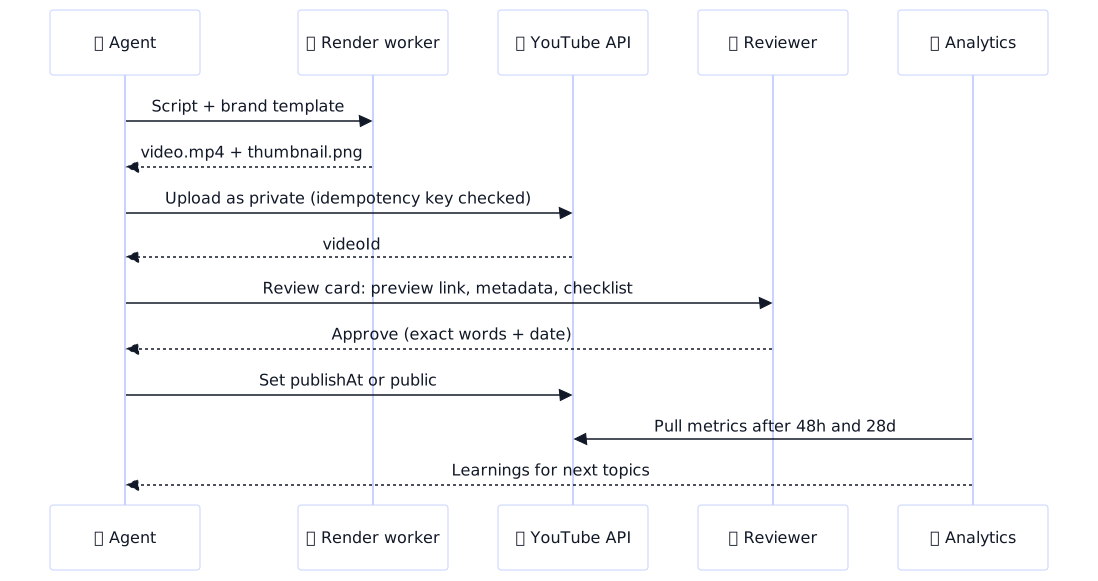
Every stage hands a file or a JSON record to the next, which makes each one testable and replaceable. The human gate sits between a private upload and anything public, and it is the only stage the agent cannot pass by itself.

Research, topic extraction and scripts
Research is where agents earn their keep, because it is tedious, wide and read-only. I give the agent three jobs.
- Search demand. Pull keyword ideas and autocomplete variants for the channel niche, then group them by intent (how-to, comparison, troubleshooting).
- Competitor gaps. List the channels that rank for those groups, read their recent titles and descriptions, and flag questions the comments keep asking that no video answers.
- Outlier videos. Find videos that performed well above their channel’s average. The pattern is in the angle and packaging, not the topic alone.
Topic extraction turns that into a shortlist. I feed the agent transcripts of my own best videos plus the competitor gaps and ask for five candidate topics, each with a one-line angle, the viewer question it answers, and the evidence behind it. A human picks one. That is the first and cheapest approval in the pipeline.
For the script, quality comes from constraints, not from a smarter model:
- A voice guide (sentence length, banned phrases, how you open and close).
- A source pack: every factual claim must trace to a document or URL the agent was given.
- A fact-check pass in a separate call that lists each claim and its source, and flags any without one.
Do not skip the human edit
A script that is 100 percent unedited agent output sounds like every other agent script. Add one personal example, one opinion, one thing only you know. That is also what separates a channel from a content farm in the eyes of the platform.
Rendering and thumbnails from a design system
Programmatic video means the video is code. A framework such as Remotion lets you build scenes as React components, feed them JSON (script segments, timestamps, captions), and render an MP4 on a server. The benefit is consistency: the same intro, lower-thirds, caption style and colors every time, with no timeline to drag by hand.
{
  "template": "explainer-v1",
  "voiceover": "out/episode-042/voice.mp3",
  "scenes": [
    { "type": "title", "text": "Automate YouTube With Agents", "start": 0, "end": 4 },
    { "type": "bullets", "items": ["Research", "Script", "Render"], "start": 4, "end": 14 },
    { "type": "code", "file": "snippets/upload.py", "start": 14, "end": 30 }
  ],
  "captions": "out/episode-042/captions.srt"
}
Where AI media helps: voiceover drafts, background music, b-roll for abstract topics, caption generation. Where it hurts: faces and products that must look real, any scene a viewer could mistake for footage of a real event, and anything that needs a disclosure label (see the policy section). My rule is that generated media fills gaps and never carries the message.
Thumbnails and titles
A thumbnail template is a design system in code: fixed grid, font, palette, a safe zone for the timestamp badge, and slots for a headline (3 to 5 words) and one image. The agent fills the slots, renders two or three variants, and the reviewer picks. This is the same idea I cover in AI ad creative generation with guardrails: constrain the format, vary only the slots.
For titles, generate five options within a length limit and a no-clickbait rule (the title must be answerable by the video). Again, a human picks.
Publishing through the YouTube Data API
The Data API handles upload, metadata, thumbnails and scheduling. Authorization is OAuth, and it has enough traps that I gave it its own article: follow the YouTube OAuth and Data API integration guide for credentials, consent screen and refresh tokens. This section assumes you already have a working token.
Three rules keep the publish stage safe:
- Always upload as private. Set
privacyStatustoprivatein the upload request. Going public is a separate call after approval. - Guard against duplicate uploads. Store an episode ID and the returned video ID in your own database before and after each upload. If a retry finds a video ID already recorded, it does nothing. A network timeout after a successful upload is how duplicates happen.
- Use
publishAtfor scheduling. A private video with apublishAttime goes public by itself at that time, so the approval can happen hours earlier.
def upload_private(youtube, episode):
    if db.get_video_id(episode.id):            # duplicate-upload guard
        return db.get_video_id(episode.id)

    body = {
        "snippet": {
            "title": episode.title,
            "description": episode.description,
            "tags": episode.tags,
            "categoryId": "28",
        },
        "status": {
            "privacyStatus": "private",         # never public from the agent
            "selfDeclaredMadeForKids": False,
        },
    }
    media = MediaFileUpload(episode.video_path, resumable=True)
    response = youtube.videos().insert(
        part="snippet,status", body=body, media_body=media
    ).execute()

    db.save_video_id(episode.id, response["id"])
    return response["id"]
Quota awareness
Every API call has a cost against a daily quota that resets at midnight Pacific Time. Costs have changed over time: older guides cite 1,600 units for a video upload, while the current official quota page lists uploads in a much cheaper, separately capped bucket. Because sources disagree, I treat the official quota calculator page as the only source of truth and check it before planning volume.
| Stage | API call | Quota note |
|---|---|---|
| Research | search.list, videos.list |
Search is the expensive one; prefer videos.list (about 1 unit) where you already have IDs |
| Upload | videos.insert |
Check the current docs; cost and caps have changed |
| Thumbnail | thumbnails.set |
Check the current docs |
| Go public or schedule | videos.update |
Check the current docs |
| Analytics | YouTube Analytics API reports.query |
Separate API with its own limits |
Quota habits that save you
- Log quota spent per run so a runaway loop shows up the same day.
- Cache research results; do not re-search the same query every run.
- Cap retries. Failed requests still cost quota.
- If you need more, request an increase through the compliance process rather than splitting work across projects.
Unverified projects may be locked to private
YouTube has required API audits for some projects before uploads can be public. If your uploads stay private even after you set them public, check the current API compliance documentation. For a private-first workflow this is less painful than it sounds, but you need to know it exists.
The approval gate
The gate is the point of the whole article. The agent uploads privately, then sends the reviewer a single card: a private preview link, the title and description, the chosen thumbnail with its alternatives, the source list from the fact-check, and the checklist below. Approval is a reply, recorded with the exact words and the date. The agent then makes the public or scheduled call. I deliver the card in chat, as described in my Slack agent workflow guide.
| Pre-publish check | Who |
|---|---|
| Facts match the source pack, no unsourced claims | Human, with agent’s claim list |
| Watched start to end at normal speed, audio levels fine | Human |
| Title honest to the content, thumbnail not misleading | Human |
| Synthetic or altered content disclosure set if needed | Human |
| No copyrighted music or footage, licenses on file | Human, agent flags matches |
| Description links, chapters and end screen correct | Agent checks, human skims |
| Not a duplicate of an existing video ID | Agent, enforced in code |
Enforce the gate in code
The publish function should refuse to run without a stored approval record for that exact video ID. Do not rely on the agent to remember to ask. See the approval-token pattern in the human-in-the-loop guide.
The analytics loop
A pipeline that only produces is half a system. After upload, a scheduled job pulls performance at two checkpoints: 48 hours (click-through rate, early retention, impressions) and 28 days (total views, average view duration, traffic sources, search terms). It writes them to a table keyed by episode ID.
The agent then writes a short learning per video: which thumbnail pattern won, where retention dropped, which search terms brought viewers. Those notes go into the research stage as context, so the next topic shortlist favors what worked and avoids what did not. I post the weekly summary to chat using the same approach as automated marketing reports in Slack, and the reporting layer can use MCP connections to analytics tools.
Keep the loop honest: small channels have noisy data, so treat a single video as a hint and look for patterns across five or more before changing strategy.
Policy and risk
Three areas deserve a manual read of the current YouTube pages, since they are updated often:
- Altered or synthetic content disclosure. YouTube asks creators to label realistic content made or altered with AI that could be mistaken for real. Add this to the checklist, not to the agent’s discretion.
- Reused or mass-produced content. Templated, repetitive uploads with little original input are a known risk for monetization and removal. Human editorial value is the practical defense.
- Misleading metadata. Titles, thumbnails and descriptions must match the video.
If you want help building a pipeline like this for a channel, see my YouTube service, AI agents work, and SEO for video search. For the wider automation picture, see marketing automation. If you run the pipeline on a server, my guides on deploying from a terminal and the VPS workstation pattern cover the hosting side.
FAQ
Can you automate a YouTube channel with AI?
You can automate most of the repeatable work: keyword and competitor research, script drafts, rendering, thumbnails, upload mechanics and reporting. The creative direction and the decision to go public should stay with a person. Fully hands-off channels tend to produce repetitive content that risks YouTube’s reused and mass-produced content policies.
Can you upload videos to YouTube automatically with the API?
Yes. The YouTube Data API videos.insert method uploads a video file with its metadata. You authorize with OAuth, upload as private first, and flip to public or scheduled after review. Unverified API projects may have uploads locked to private, so check the current audit requirements.
Is YouTube automation with AI allowed by YouTube policy?
Using AI tools is allowed, but content must still follow YouTube’s policies, including rules on spam, reused or repetitive content, and misleading metadata. Mass-produced, low-effort uploads can be demonetized or removed. Check the current YouTube policy pages, since they change.
Do you have to disclose AI-generated content on YouTube?
YouTube asks creators to disclose realistic altered or synthetic content, such as a realistic voice or scene that could be mistaken for real. Clearly unrealistic or animated content and basic productivity uses generally do not need it. Check the current disclosure guidance before relying on this.
How do you automate YouTube thumbnails?
Render thumbnails from a template that encodes your design system: fixed layout, fonts, colors and safe zones, with a variable headline and image. Generate two or three variants, then let a person pick. Upload the chosen one through the API after the video exists.
What are YouTube Data API quota limits for uploads?
Projects get a default daily quota, and the cost per method is published on the official quota calculator page. Older guides cite 1,600 units for an upload, and the cost has been reported to change, so check the current docs. Quota resets at midnight Pacific Time, and you can request an increase.
Can AI channels be monetized?
They can be, if the channel meets the YouTube Partner Program requirements and the content is original and adds value. Repetitive, templated or reused content is a common reason for rejection. Human editorial input is the practical safeguard.