Human-in-the-Loop AI Agents: Approval Gates That Work
Design human-in-the-loop AI agents: risk tiers, approval gates, escalation rules, hard stops and an audit trail you can trust.
Every team that ships AI agents eventually hits the same moment. The agent does something useful on its own, then does something nobody expected, and someone asks: “Where was the human in all this?” I build agent fleets for marketing automation, and the honest answer is that “human in the loop” only works when you design it as a system, not when you bolt a confirmation button onto the end.
This guide is the practical version of what I use: risk tiers, approval gates, escalation rules, hard stops, and an audit trail you can trust. Everything here is generic and replicable, so you can adapt it to any agent stack.
TL;DR
Classify every agent action by risk, then route it: auto-run, approval gate, or hard stop. Enforce the routing in code outside the model. Record every approval with the human’s exact words and the date, because a paraphrase never counts. Escalate only critical decisions, and when approval is missing, the agent says “blocked on approval” instead of guessing.
In This Guide click to collapse
Human in the loop is a design decision, not a checkbox
“Human in the loop” gets used for three very different setups. Mixing them up is the root of most oversight failures, so name the one you are building.
| Mode | Human role | Agent can act without a human? | Good for |
|---|---|---|---|
| In the loop | Approves each consequential step | No | Spend, publishing, customer-facing sends |
| On the loop | Monitors, can interrupt or roll back | Yes, within limits | Reversible work at volume |
| Out of the loop | Reviews outcomes after the fact | Yes | Read-only analysis, drafts, internal notes |
A single agent usually spans all three. It reads data out of the loop, drafts on the loop, and publishes in the loop. The design work is deciding which action belongs where, and that is what the rest of this article covers.
Classify actions by risk
I do not gate agents, I gate actions. The first step is a short list of what the agent can do, each tagged with a risk tier. The tier decides the control.
| Tier | Examples | Control |
|---|---|---|
| 1. Read | Pull a report, search files, summarize a thread | Auto-run, logged |
| 2. Reversible write | Create a draft, edit a scratch file, add a label | Auto-run with a notification |
| 3. Irreversible write | Publish a page, send an email, merge code | Human approval required |
| 4. Spend or exposure | Raise a budget, make something public, share externally | Human approval plus a cap |
| 5. Forbidden | Delete production data, exceed spend limits | Hard stop, no approval can unlock it |
The question that sorts an action is simple: “If this is wrong, can I undo it before anyone notices?” If yes, let the agent move fast. If no, a human decides.

Takeaway
Write the action list first. If you cannot say which tier an action sits in, the agent should not be allowed to perform it yet.
Approval gates that actually work
A gate is a pause with a decision attached. A weak gate says “Proceed? Y/N” and the human clicks yes because they have no context. A working gate has five properties:
- It pauses before the action, not after. An undo button is not a gate.
- It states intent. One short summary: what will happen, to what, and why. Include the exact payload (the email text, the new budget figure, the diff).
- It offers three outcomes. Approve, reject, or request changes. “Request changes” matters because it turns a dead end into feedback.
- It expires. If nobody answers, the default is deny, never approve.
- It names the risk tier, so the reviewer knows how carefully to read.
When approval has not arrived, the agent must not improvise a workaround. I make the agent report a literal status, “blocked on approval,” and stop that branch of work. It can keep doing tier 1 and 2 tasks elsewhere, but it does not guess what the human would have said.
Common mistake: approve-on-silence
Timeouts that auto-approve turn your gate into a delay. A gate that fails open is not a gate. Always fail closed.
Escalation: ask only about critical decisions
Gates handle known risky actions. Escalation handles the unknown: the agent hits something it cannot or should not decide. The temptation is to let the agent ask whenever it feels unsure, and that is how you get a flood of questions nobody reads.
I restrict escalation to four triggers:
- A policy hit: the plan touches a tier 4 or 5 action.
- Missing information that changes the outcome: not a detail the agent can look up or reasonably assume.
- Conflicting instructions: two standing rules disagree.
- Low confidence on something irreversible.
Everything else, the agent decides, notes its assumption in the log, and moves on. When it does escalate, the message carries context: the decision needed, two or three options, the agent’s recommendation, and what happens if nobody answers. A good escalation can be answered in under thirty seconds.
Hard stops no approval can unlock
Some actions should never be one click away, even for a trusted reviewer, because a tired human approves the wrong thing. These are my standard hard-stop categories:
- Spend: anything above a fixed cap per action and per day.
- Going public: publishing, posting, or sharing outside the organization.
- Deletion: removing data, files, or accounts.
- Shipping code: deploying or merging to a production branch.
- Quality sign-off: declaring work “done” or “approved for release” on the agent’s own judgment.
“Hard stop” here means the agent cannot do it alone. It needs a separate, explicit human action, and some (like exceeding a spend cap) need a config change rather than an approval. The critical part is enforcement: the check lives in the tool layer, in code the model cannot edit or talk its way around. A prompt that says “never delete files” is a request. A tool that refuses to delete without a valid token is a control.
Do not rely on the model to police itself
If the only thing between the agent and a bad action is its own instruction-following, you have a suggestion, not a guardrail. Put the gate where the action executes.
Approval provenance and the audit log
This is the part most guides skip, and it is where trust is won or lost. An approval is only useful if you can later prove who approved what, when, and on what evidence. My rule is blunt: an approval must carry the human’s exact words and the date. A paraphrase never counts.
Why? Because agents summarize. “The user said it was fine to go ahead” is not an approval. “Approved, send it as written, 2026-03-04” is. If the agent has to reconstruct the human’s intent from memory, you have lost provenance and you cannot audit it.
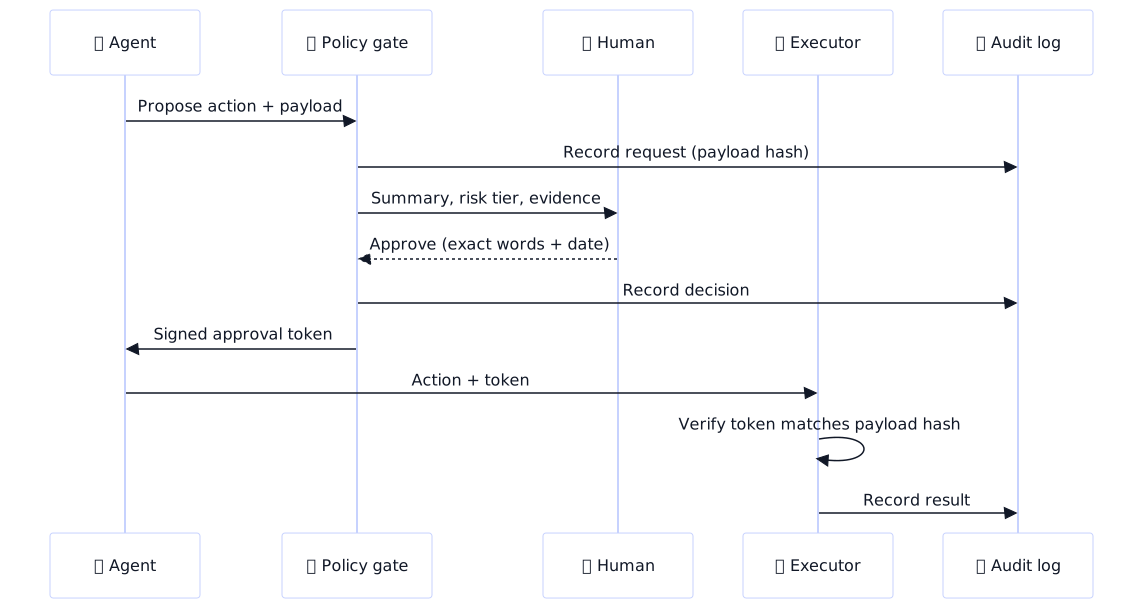
Each approval record should contain:
| Field | What it holds | Why it matters |
|---|---|---|
| actor | Who approved | Accountability |
| decision | approve, reject, or changes requested | Clear outcome |
| quote | The human’s exact words | Defeats paraphrase drift |
| payload_hash | Hash of the exact action approved | Approval cannot be reused for a different action |
| evidence | Link to the diff, preview, or report shown | Proves what the human actually saw |
| timestamp and expiry | When approved, when it lapses | Stale approvals die |
Store these in an append-only log: new rows, never edits. When something goes wrong, the log answers the three questions that matter: what did the agent try, who allowed it, and what did they see when they allowed it.
Avoiding approval fatigue
If humans approve 200 things a day, they stop reading. Rubber-stamping is worse than no gate because it creates false confidence. The fixes I use:
- Route by risk. Tier 1 and 2 never reach a human. The queue contains only what deserves attention.
- Batch similar approvals. Ten near-identical drafts become one review with a representative sample plus a diff of the exceptions.
- Sample audits for low tiers. Instead of approving every reversible write, review a random slice weekly and tune from what you find.
- Turn feedback into standing rules. When a human rejects or edits something, ask why once, then write it down as a rule the agent follows from then on. The same correction should never be needed twice.
- Measure the queue. Track approval rate, edit rate, and time to decision. A 99 percent approval rate with two-second decisions means the gate is decoration.
Standing rules are the payoff
Every rejection is training data for your policy. Over a few weeks the gate gets quieter because the agent stops proposing what humans keep refusing.
A minimal implementation
You do not need a platform for this. A policy table, a gate function, and an executor that verifies tokens are enough to start. Here is the approval record:
{
  "id": "apr_0001",
  "action": "publish_post",
  "tier": 3,
  "actor": "reviewer-01",
  "decision": "approve",
  "quote": "Approved, publish as written.",
  "payload_hash": "sha256:9f2c...e1",
  "evidence": "https://kikocreates.example/previews/post-123",
  "approved_at": "2026-03-04T10:15:00Z",
  "expires_at": "2026-03-05T10:15:00Z"
}
And the gate wrapper, in generic pseudo-code. The important detail is that the executor, not the agent, checks the token:
TIERS = {
    "read_report": 1,
    "create_draft": 2,
    "publish_post": 3,
    "raise_budget": 4,
    "delete_data": 5,
}

def run_action(action, payload, token=None):
    tier = TIERS.get(action, 5)          # unknown actions are forbidden
    record(action, payload, tier)        # audit log, always

    if tier == 5:
        raise HardStop(action)           # no approval unlocks this

    if tier >= 3:
        if token is None:
            return Blocked("blocked on approval")
        if not valid(token, action, hash_of(payload)) or expired(token):
            return Blocked("approval invalid or expired")

    return EXECUTORS[action](payload)    # only runs when checks pass
Two design choices carry the weight here. Unknown actions default to the strictest tier, so new tools are safe until classified. And the token is bound to a hash of the payload, so an approval for one email cannot be reused to send a different one. If you are connecting an agent to external tools through MCP, the same split applies: read tools run freely, write tools sit behind a gate. I cover tool design in MCP for Marketers: Connect Claude to Ads and Analytics.
If you run agents on a remote machine, keep the policy gate and the audit log on that machine, outside the agent’s working directory. My setup for that is in Advanced Claude Code: The VPS Workstation Pattern, and the deploy side (a classic tier 3 action) is in Claude Code on a VPS: Deploy and Build from Your Terminal.
Rollout plan and checklist
Start stricter than you think you need to, then loosen with data. A rollout that has worked for me:
- Week 1: Gate every write. Everything except tier 1 needs approval. You will hate the volume, and that is the point: it shows you what is actually routine.
- Week 2: Review the log. Actions approved unchanged 95 percent or more of the time and fully reversible move down a tier.
- Week 3 onward: Convert recurring corrections into standing rules. Add sampling audits for the tiers you relaxed.
- Always: Keep the hard stops fixed. Loosening those is a policy decision, made deliberately, never a side effect of tuning.
Pre-launch checklist
- Every agent action has a risk tier, and unknown actions default to the strictest.
- Gates enforce in the tool layer, not in the prompt.
- Timeouts deny. Nothing approves on silence.
- Each approval stores the exact words, the date, and a payload hash.
- Hard stops cover spend, going public, deletion, shipping code, and quality sign-off.
- Escalation is limited to critical decisions and always includes options and a recommendation.
- The audit log is append-only and reviewed on a schedule.
- Feedback has a path to become a standing rule.
If you want help designing this for a marketing team, my AI agents service and marketing automation work both start with exactly this risk mapping.
FAQ
What is human in the loop in AI agents?
It is a design where a person reviews or approves an AI agent’s consequential actions before they happen. The agent proposes, the human decides, and the system only executes what was approved. It is applied selectively, to the actions where a mistake is costly or irreversible.
When should an AI agent ask for human approval?
Ask for approval when an action cannot be undone, spends money, sends something to a customer, makes content public, deletes data, or ships code. Reads and easily reversible edits should run on their own so the human is only pulled in when it matters.
What is the difference between human in the loop and human on the loop?
In the loop means a human approves each consequential step before it runs. On the loop means the agent acts autonomously within limits while a human monitors and can interrupt or roll back. In the loop suits irreversible actions, and on the loop suits high-volume reversible work.
How do you prevent approval fatigue in AI workflows?
Route by risk so only meaningful actions reach a human, batch similar approvals, audit low-risk tiers by sampling instead of approving each item, and convert repeated corrections into standing rules. Track approval rate and decision time: near-100 percent approvals made in seconds mean people have stopped reading.
How do you log and audit AI agent decisions?
Write every request, approval, and result to an append-only log. For each approval, store the approver, their exact words, the date, a hash of the approved payload, and a link to the evidence they saw. Review the log on a schedule and use rejections to refine the rules.
Can an AI agent bypass its own approval gate?
It can if the gate is only an instruction in the prompt. It cannot if the check lives in the tool layer: the executor refuses to run gated actions without a valid, unexpired token bound to the exact payload, and the agent has no ability to issue that token itself.
How do you set escalation rules for an AI agent?
Limit escalation to critical triggers: policy hits, missing information that changes the outcome, conflicting rules, and low confidence on irreversible actions. Every escalation should include the decision needed, a few options, a recommendation, and the default if nobody responds.