MCP for Marketers: Connect Claude to Ads and Analytics
Connect Claude to ads and analytics with MCP: build vs buy, a custom server walkthrough, and safe write access with approval gates.
Every marketing team I have worked with has the same Monday ritual: export a CSV from the ad platform, export another from analytics, paste both into a chat, and ask an AI to find what changed. It works once. By the third week the exports are stale, the columns have moved, and nobody trusts the numbers. I wanted the assistant to ask the systems directly, so I built a custom MCP server that let a marketing team drive its automation platform from Claude. This post is the generic, replicable version of what I learned.
TL;DR
MCP (Model Context Protocol) is an open standard that lets Claude call tools you define, such as “get campaign metrics”. Use a hosted connector for common platforms, build your own server for internal tools or custom queries. Start with narrow, read-only, size-capped tools and a read-only token. Add write tools later, behind human approval, dry-run previews and an audit log.
In This Guide click to collapse
What MCP is, in marketer terms
The Model Context Protocol is an open standard for connecting AI applications to external systems. The application (Claude Desktop, Claude Code) is the host. It starts one client per connection, and each client talks to an MCP server: a small program that exposes capabilities. Servers can offer three kinds of things:
- Tools: functions Claude can call, like
get_campaign_metrics. - Resources: read-only context such as a document or a schema.
- Prompts: reusable templates, like “weekly paid media audit”.
For marketers, tools are the part that matters. Instead of pasting an export, you ask “how did campaign 42 perform last week?”, Claude calls the tool, the server queries the real system, and the answer is grounded in live data. Under the hood the messages are JSON-RPC 2.0, so any client that speaks MCP can use any server that speaks MCP.
Two transports exist today. stdio runs the server as a local child process of the host and talks over standard input and output; it is the simplest setup and suits a single user. Streamable HTTP runs the server as a web service that many clients can reach, with standard HTTP authentication (bearer tokens, API keys, and OAuth, which the spec recommends). Use stdio to prototype, HTTP when a team shares one server.

Build or buy
You do not always need your own server. Hosted connectors from the platforms or aggregator vendors cover the standard ad and analytics systems, and community servers exist for many more. The decision comes down to who controls the tool surface.
| Option | Setup time | Control | Security review | Maintenance |
|---|---|---|---|---|
| Hosted connector (vendor or platform) | Minutes | Low: fixed tools | Vendor terms, OAuth scopes | Vendor |
| Community open-source server | An hour | Medium: fork it | You must read the code | You, if it goes stale |
| Custom server | A day for a first version | Full: your queries, your limits | Your own code and tokens | You |
My rule of thumb
Buy (or install) for commodity reads on a mainstream platform. Build when you need an internal system exposed, a blended metric the platforms do not compute, a hard row cap, or a write action with your own approval flow. Always check which tools a third-party server exposes before connecting it to anything with spend attached.
Designing tools for marketing data
The mistake I see most is wrapping a whole API as one tool that accepts a raw query string. That gives the model a huge surface to get wrong and gives you nothing to audit. Design tools the way you would design a good report:
- Narrow: one question per tool (“metrics for a campaign and date range”, “top ads by a metric”).
- Typed: explicit parameters, dates as ISO strings, metrics from an allowlist.
- Templates, not raw query languages: your server builds the query; the model only fills in parameters.
- Read-only by default: separate read and write tools, and do not ship the write ones at first.
- Descriptive docstrings: the description is what the model reads to decide when to call the tool.
Walkthrough: a minimal read-only server
Here is a small Python server with two read-only tools against a placeholder API at api.example.com. It uses the official MCP Python SDK. Install it with pip install "mcp[cli]" (or uv add "mcp[cli]"). I use only the standard library for HTTP so the example does not depend on a particular HTTP client.
import json
import os
import sys
import urllib.parse
import urllib.request
from datetime import date

from mcp.server.fastmcp import FastMCP

mcp = FastMCP("marketing-readonly")

API_BASE = "https://api.example.com/v1"   # placeholder API
MAX_ROWS = 25                              # hard cap on rows returned
MAX_DAYS = 92                              # hard cap on date range
ALLOWED_METRICS = {"clicks", "conversions", "spend", "ctr"}


def _get(path: str, params: dict) -> dict:
    """Read-only GET. The token comes from the environment, never from the prompt."""
    url = f"{API_BASE}{path}?{urllib.parse.urlencode(params)}"
    req = urllib.request.Request(
        url, headers={"Authorization": f"Bearer {os.environ['EXAMPLE_API_TOKEN']}"}
    )
    print(f"GET {path} {params}", file=sys.stderr)   # stderr only, never stdout
    with urllib.request.urlopen(req, timeout=20) as resp:
        return json.load(resp)


@mcp.tool()
def get_campaign_metrics(campaign_id: str, start_date: str, end_date: str) -> dict:
    """Totals for one campaign (impressions, clicks, spend, conversions)
    between two ISO dates (YYYY-MM-DD). Maximum range is 92 days."""
    start, end = date.fromisoformat(start_date), date.fromisoformat(end_date)
    if end < start or (end - start).days > MAX_DAYS:
        raise ValueError(f"Date range must be 0 to {MAX_DAYS} days")
    data = _get("/metrics", {"campaign": campaign_id, "from": start_date, "to": end_date})
    return {k: data.get(k) for k in ("impressions", "clicks", "spend", "conversions")}


@mcp.tool()
def list_top_ads(campaign_id: str, metric: str = "conversions", limit: int = 10) -> list[dict]:
    """Top ads in a campaign ranked by one metric: clicks, conversions, spend or ctr."""
    if metric not in ALLOWED_METRICS:
        raise ValueError(f"metric must be one of {sorted(ALLOWED_METRICS)}")
    limit = max(1, min(limit, MAX_ROWS))
    data = _get("/ads", {"campaign": campaign_id, "sort": metric, "limit": limit})
    return [
        {"ad_id": a.get("id"), "name": a.get("name"), metric: a.get(metric)}
        for a in data.get("ads", [])[:limit]
    ]


if __name__ == "__main__":
    mcp.run(transport="stdio")
What matters here is not the syntax, it is the guardrails: the date range is capped, the metric is validated against an allowlist, the row count is clamped, the response keeps only the fields the model needs, and logging goes to stderr. With the stdio transport, anything written to stdout corrupts the protocol messages, so never use a bare print() to stdout.
SDK details move quickly
The Python SDK has been evolving and the newest official quickstart names the server class differently from the FastMCP import above. The structure (create a server, decorate functions as tools, call run) stays the same. Check the current SDK docs at modelcontextprotocol.io for the exact import and any transport options before you copy this into production. The TypeScript SDK follows the same pattern with a schema library for inputs.
To serve a team instead of one laptop, switch the last line to the Streamable HTTP transport (the SDK accepts transport="streamable-http"; confirm the option name for your installed version) and put it behind HTTPS and authentication.
Connect it to Claude Code and Claude Desktop
In Claude Code, register a local stdio server with the claude mcp add command. Everything after the double dash is the command that starts your server:
claude mcp add --transport stdio --env EXAMPLE_API_TOKEN=your-readonly-token \
  marketing -- python /path/to/marketing_server.py

# a remote Streamable HTTP server instead
claude mcp add --transport http marketing https://mcp.example.com/mcp

# share the config with your team through a project-level .mcp.json
claude mcp add --scope project --transport http marketing https://mcp.example.com/mcp
The default scope is local to you; user applies across all your projects and project writes a .mcp.json you can commit. Do not commit tokens inside it. Run claude mcp list to confirm the server is connected, or use /mcp inside a session.
In Claude Desktop, add the server under the mcpServers key of claude_desktop_config.json (on Linux ~/.config/Claude/, on macOS ~/Library/Application Support/Claude/, on Windows %AppData%\Claude\), then restart the app:
{
  "mcpServers": {
    "marketing": {
      "command": "python",
      "args": ["/absolute/path/to/marketing_server.py"],
      "env": { "EXAMPLE_API_TOKEN": "your-readonly-token" }
    }
  }
}
Use absolute paths. The host launches the process, so relative paths and shell aliases usually fail.
Credentials and permissions
The server is your permission boundary, so treat its credentials as seriously as the ad account itself.
- Dedicated service account per platform, never a personal login.
- Read-only scopes for the token the read tools use. A separate, tightly scoped token for any write tool.
- Secrets in environment variables or a secret manager. Never in tool arguments, prompts, or a committed
.mcp.json. - Per-client separation. One server config per client account, so a question about one client can never reach another’s data.
- Least data: return only the fields a tool needs. Do not pass personal data through if aggregates answer the question.
If you want help scoping this for a real stack, this is the kind of work I cover under AI agents and marketing automation.
Safe write access
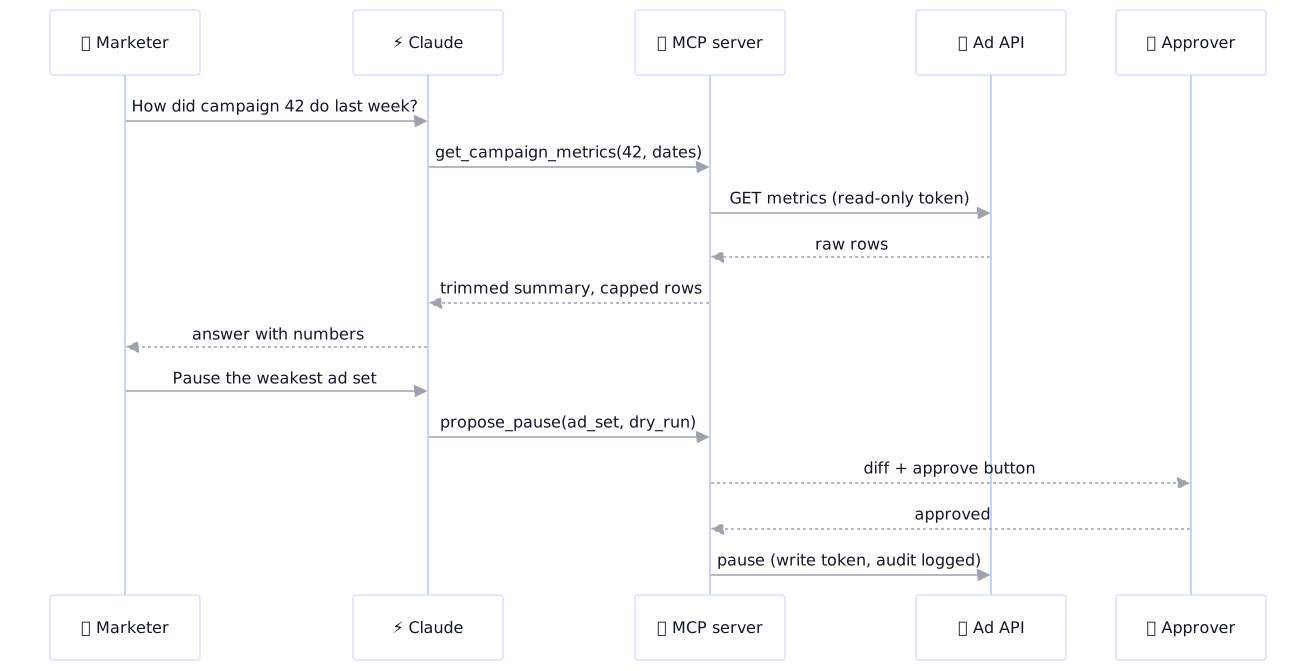
Reading is low risk. Pausing a campaign or changing a budget is not. My rule: the model proposes, a human approves, the server executes. I go deeper on the pattern in human-in-the-loop approval gates for AI agents; here is how it maps to MCP.
| Tool type | Example | Recommended gate |
|---|---|---|
| Read, aggregated | get_campaign_metrics | None beyond row and date caps |
| Read, sensitive | customer-level export | Allowlist per user, audit log |
| Write, reversible | pause an ad set | Dry-run diff plus human approval |
| Write, spend or public | raise budget, publish an ad | Approval by a named owner, hard limits in code |
| Destructive | delete a campaign | Do not expose as a tool |
- Propose, do not execute. A
propose_pausetool returns a dry-run: what would change, current versus new state. It writes nothing. - Human approval outside the model. The approval should come from a person clicking approve in a channel the model cannot reach (a Slack button, a ticket). The protocol also defines elicitation, which lets a server ask the user for input or confirmation mid-call, but check that your client supports it and never rely on the model’s own “are you sure” as the control.
- Scoped write token. Held by the server, used only after approval, limited to the one action.
- Limits in code. A budget change capped at a percentage, an allowlist of campaign IDs, no more than N changes per hour.
- Audit log. Who asked, what was proposed, who approved, what executed, timestamp, request ID. Append-only.
Tool results are untrusted input
Ad copy, comments and form fills can contain text that tries to instruct the model. Because your tool returns that text into the conversation, a write tool reachable in the same session is a prompt-injection risk. Another reason approval must happen outside the model, and why read and write tools belong in separate servers or at least separate tokens.
Keeping responses small
Every byte a tool returns lands in the context window. Unbounded exports crowd out the actual conversation and raise cost. The fixes are boring and effective:
- Aggregate on the server. Return totals and top-N, not raw rows.
- Cap rows (the
MAX_ROWSabove) and tell the model when results were truncated. - Paginate with a cursor parameter if a longer list is really needed.
- Whitelist fields. Return three useful columns, not forty.
- Round numbers and use short keys.
Testing and common failures
Test the server before involving Claude. The official MCP Inspector (npx @modelcontextprotocol/inspector) lets you list tools and call them by hand. Then check from the client side.
| Symptom | Likely cause | Fix |
|---|---|---|
| Server never appears in Claude | Config typo, relative path, app not restarted | Use absolute paths, validate the JSON, restart |
| “Connection closed” right after start | Crash on import, or stdout output | Run the command by hand, log to stderr only |
| Tools list is empty | Decorator missing or wrong server object | Check with the Inspector |
| 401 or 403 from your API | Token missing in the host’s environment | Set it in the env block, not your shell |
| Remote server not detected | Hand-written .mcp.json without a type |
Add "type": "http" or use claude mcp add |
| Answers get slow or cut off | Oversized tool results | Aggregate, cap, paginate |
Workflows worth building first
- Weekly audit: “Compare last week to the previous week for the top five campaigns and flag anything that moved more than 20 percent.”
- Anomaly check: a scheduled run that calls the metrics tool and posts only exceptions.
- Creative performance pull: top and bottom ads by conversion with their text, to brief the next test.
Once the read tools are solid, run them from an always-on machine. I describe that setup in my Claude Code VPS workstation pattern and the deploy side in deploying from the terminal with Claude Code.
Launch checklist
- Read-only token, dedicated service account
- Date, row and metric limits enforced in code
- Logs on stderr, request log with tool name and arguments
- No write tools until approval flow and audit log exist
- Tested with the Inspector, then with Claude
FAQ
What is an MCP server and what does it do for marketing?
An MCP server is a small program that exposes tools, resources and prompts to AI applications through the Model Context Protocol. For marketing, it lets Claude query live ad, analytics and internal data directly, instead of working from pasted exports.
Is there an official Google Ads MCP server?
Platform vendors and third parties publish MCP servers for major ad platforms, and the situation changes quickly. Check the platform’s own developer documentation and the official MCP servers directory for the current status, and review what tools any server exposes before connecting it to a live account.
Can Claude connect to Google Analytics 4?
Yes, through an MCP server that wraps the analytics reporting API, either a hosted connector, a community server or one you build. Whichever you pick, use a read-only service account and have the server return aggregated results.
Is it safe to give an AI access to my ad accounts?
It can be, if you control the access. Use read-only tokens, expose narrow typed tools, cap output, keep write actions behind human approval, and log every call. Do not give a model a broad token with spend authority.
Should I build my own MCP server or use an existing one?
Use an existing hosted or community server for standard reads on mainstream platforms. Build your own when you need to expose internal tools, compute custom metrics, enforce hard limits, or add approval-gated writes.
How do I build a custom MCP server?
Install the official Python or TypeScript SDK, define a server, write each capability as a typed, documented function registered as a tool, and run it over stdio. Register it with Claude using claude mcp add or the Claude Desktop config. Test it with the MCP Inspector first.
What is the difference between MCP and an API?
An API is a specific service’s interface, with its own endpoints and auth. MCP is a standard way for an AI application to discover and call tools, and your MCP server typically wraps one or more APIs behind it. The API does the work; MCP gives the model a uniform, controllable way to reach it.