Slack AI Agent Workflow: From Request to Report
Build a Slack AI agent workflow: ticket intake, clarifying questions, critical-only escalation and a screenshot report back.
Most “Slack bots” I see in marketing teams are glorified forms. Someone posts a request, the bot creates a ticket, and then the request sits there until a human reads it, misunderstands it, and asks three questions two days later. The waiting is the expensive part, not the work.
The pattern I build instead flips that. The agent starts the moment the ticket exists, asks the requester its clarifying questions in the Slack thread, bothers the tech lead only for critical or architectural decisions, and finishes by replying to the requester with what changed and a screenshot. This guide covers the full loop: thread message design, ticket states, escalation rules and guardrails. It is framework-agnostic, so it works with Google ADK, the Claude Agent SDK or any agent runtime.
TL;DR
Treat the Slack thread as the unit of work and the ticket as the source of truth. A bot turns a request into a ticket and the agent starts immediately. It asks the requester a few high-value questions (and proceeds on stated assumptions if nobody answers), escalates only spend, public claims, data deletion and architecture calls to a named owner, runs checks, then posts a summary plus a screenshot. Idempotency keys and a ticket state machine keep it from acting twice.
In This Guide click to collapse
- The workflow in one picture
- Slack app setup: events, scopes and threads
- Intake: turning a message into a ticket
- Clarifying questions: ask the requester first
- The build step in an isolated workspace
- Escalation: only critical decisions go up
- Reporting back with a screenshot
- State, retries and idempotency
- Guardrails
- Build vs no-code
- FAQ
The workflow in one picture
Six steps, one thread. The requester never leaves Slack, and the tech lead only appears when the agent genuinely needs a decision it should not make alone.
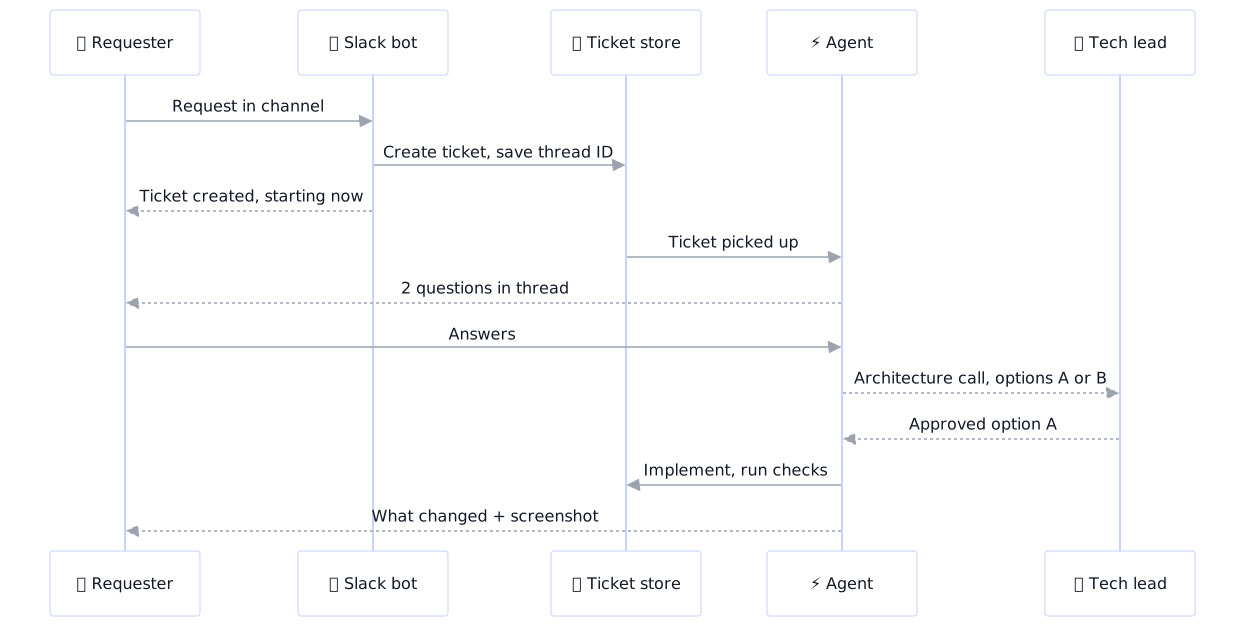
The gain is timing: work and questions run in parallel. If you want the always-on machine that runs this, see my VPS workstation pattern.
Slack app setup: events, scopes and threads
Create one Slack app per environment (dev and production) and use Events API over HTTPS, or Socket Mode if you cannot expose a public endpoint. Three habits save you pain later.
- Verify every request. Check the signing secret and timestamp on each incoming call and reject anything stale or unsigned.
- Acknowledge fast, work later. Slack expects a quick HTTP 200 (about three seconds). Put the event on a queue, return immediately, and let a worker do the slow part. Slack retries unacknowledged events, which is why idempotency matters (see below).
- Use the thread timestamp as the conversation key. Every message in a thread shares the parent’s
thread_ts. That single value ties the Slack conversation to one ticket.
| Scope | Why the agent needs it |
|---|---|
app_mentions.read |
Receive mentions of the bot, the cleanest trigger for a request |
channels:history |
Read replies in public intake channels (needed for the message.channels event) |
chat:write |
Post questions and updates into the thread |
files:write |
Upload the screenshot as proof of work |
reactions:write |
Add status reactions (eyes, hammer, check) without noisy messages |
Slack’s own docs suggest subscribing to app_mention when the app only cares about messages addressed to it. I follow that for the first message, then listen for thread replies only on tickets that are waiting for an answer. Scope names and file upload methods change over time, so check the current Slack API docs before you configure the app, especially for uploads and rate limits.
Request least privilege
Do not add channels:history everywhere “just in case”. Invite the bot only to the intake channel, and keep admin scopes off entirely.
Intake: turning a message into a ticket
A free-text message is not a ticket. The intake step normalizes it into fields the agent can rely on, and it should take seconds, not a model-driven interview.
{
  "ticket_id": "REQ-142",
  "idempotency_key": "C0INTAKE:1731300000.000100",
  "slack_channel": "C0INTAKE",
  "thread_ts": "1731300000.000100",
  "requester": "U0REQUESTER",
  "summary": "Swap hero image and update CTA copy on the pricing landing page",
  "type": "site_change",
  "risk": "low",
  "status": "new",
  "assumptions": [],
  "open_questions": []
}
Three things matter here:
- Classification. A cheap model call (or even rules) assigns a type and a risk level. Risk drives the escalation policy later.
- Dedupe. The key is channel plus the parent message timestamp. If Slack redelivers the event, or the requester posts the same request twice, you update the existing ticket instead of creating a second one.
- Immediate acknowledgement. The bot replies in the thread within seconds with the ticket ID and “starting now”. The requester knows it landed, and the thread is now the canonical place for the conversation.
Clarifying questions: ask the requester first
This is the part most agent demos skip, and it is where trust is won or lost. The people who know what “make the page feel more premium” means are the requesters, not the tech lead. So the agent asks them, in the thread, and escalates upward only when the question is not theirs to answer.
The rules I use:
- Start work first, ask second. The agent reads the page, the repo or the data before asking anything, so every question is specific and grounded.
- Ask in one message, numbered, maximum three questions. A wall of questions gets ignored. Pick the ones that would change the implementation.
- Offer a default with every question. “Should the new CTA say ‘Start free trial’ or ‘Book a demo’? I will use ‘Start free trial’ unless you tell me otherwise.”
- Timebox the wait. If the requester does not reply within a set window, the agent proceeds on the stated defaults and records them as assumptions on the ticket.
- Never ask what it can look up. Brand colors, existing copy and file locations are discoverable. Asking for them wastes goodwill.
Here is the thread message design I use for a question round. Plain text with light formatting works better than heavy Block Kit for conversational turns.
Ticket REQ-142: working on it. Two quick questions so I get this right:

1. Hero image: use the new campaign photo in the shared folder, or keep the current style? (Default: new photo.)
2. CTA copy: "Start free trial" or "Book a demo"? (Default: "Start free trial".)

Reply here in this thread. If I do not hear back by 15:00 I will go with the defaults and list them in my summary.
Key point
A question with a default and a deadline never blocks the work. The worst case is that the agent uses the default and flags it, which a human can fix in one reply.
Resolve answers by reading the thread, not by trusting the model’s memory. On each reply, the worker loads the ticket, appends the answer to a structured list and resumes. That is what makes the loop survive restarts.
The build step in an isolated workspace
When the agent builds, it works in a disposable workspace: a fresh branch or a copy of the project, a scoped credential and no access to production. The agent framework is interchangeable here. Google ADK, the Claude Agent SDK or a hand-rolled tool loop all do the same job: read the ticket, plan, call tools, run checks.
Two design choices keep the build reliable:
- The ticket is the prompt. Give the agent the ticket JSON, the answered questions and the assumptions list. Never feed it the raw Slack history, which is noisy and may contain instructions from other people.
- Checks are part of “done”. Run the build, tests or a linter, and open the changed page in a headless browser. A ticket that passes no check cannot reach the Done state.
For a concrete example of running an agent from a terminal on a server, see deploying from a terminal on a VPS.
Escalation: only critical decisions go up
The tech lead’s attention is the scarcest resource in the system. Spend it on decisions that are expensive to reverse, not on every ambiguity. The test I use: “If the agent guesses wrong, who pays and how fast can we undo it?”
| Situation | Who decides | Example |
|---|---|---|
| Wording, layout or copy preference | Agent, after asking the requester | Which CTA text to use |
| Scope clarification within the ticket | Requester | “Only the pricing page, or all landing pages?” |
| Architecture or data model change | Tech lead (approval) | Adding a new dependency or changing a shared schema |
| Spend or budget impact | Named owner (approval) | A paid API tier, an ad budget change |
| Public-facing claim | Named owner (approval) | New pricing statement, “guaranteed” language |
| Deleting or overwriting data | Hard stop, owner approval plus backup | Dropping a table, removing live pages |
An escalation is a message to the owner (a DM or a thread in a private channel) with the decision framed as options, a recommendation and the cost of each. Approve or reject buttons write the decision back to the ticket. I cover the approval mechanics, expiry and audit trail in human-in-the-loop approval gates.
Ticket REQ-142 needs an architecture call (escalated, requester is informed).

Option A: reuse the existing component, 2 files changed. (Recommended.)
Option B: add a new image-optimization package, 9 files changed, new dependency.

Approve A / Approve B / Ask me something. Expires in 4 hours, default is to proceed with A on the isolated branch only.
For reversible choices on an isolated branch, proceeding with the recommendation is safe. For spend and deletion, no answer means no action.
Reporting back with a screenshot
The finish line is a message the requester can act on in ten seconds. I use a fixed structure so people learn to scan it:
Done: REQ-142

What changed
- Hero image replaced with the new campaign photo
- CTA text now "Start free trial"

Assumptions I made
- Applied to the pricing page only

Checks: build passed, page loads, no console errors
Preview: https://staging.example.com/pricing
[screenshot attached]

Reply "ship it" to publish, or tell me what to adjust.
The screenshot is proof of work, not decoration. Capture it with a headless browser after the checks pass, ideally at both desktop and mobile widths, and upload it into the same thread. Check the current Slack docs for the right file upload flow for your SDK, because the older single-call upload has been replaced by a newer external upload process.
Publishing stays a separate, explicit step owned by a human, which gives you a clear audit event (“ship it” with a user and a timestamp).
State, retries and idempotency
Agents crash, Slack redelivers events and requesters edit messages. Without a state machine, you get duplicate tickets and double actions. The ticket carries explicit states, and every transition is recorded.

| State | Meaning | Who moves it forward |
|---|---|---|
| New | Ticket created, thread bound | Agent worker picks it up |
| Building | Agent is working in its workspace | Agent |
| Needs info | Waiting on the requester, with a timeout | Requester reply or timeout defaults |
| Awaiting approval | Waiting on the tech lead or owner | Approval button, or expiry |
| Checking | Build, tests, screenshot | Agent |
| Done | Reported to the requester | Terminal (publish is a separate action) |
| Failed | Could not complete; handoff note posted | A human takes over |
Four mechanisms keep the machine honest:
- Idempotency keys. Create tickets and side effects with a key (channel plus thread timestamp plus step). A redelivered event finds the existing record and does nothing.
- Leases. A worker claims a ticket with a time-limited lock, so two workers never build the same ticket.
- Resume from state. After a crash, the worker reads the ticket’s state and answered questions and continues from the last completed step, not from the top.
- Bounded retries. Retry transient failures a small number of times, then move to Failed with a note that says what was tried. Never loop silently.
def handle_event(event):
    key = f"{event['channel']}:{event['thread_ts']}"
    ticket = tickets.get_or_create(idempotency_key=key, data=normalize(event))
    if ticket.status != "new":
        return  # redelivery or duplicate request, nothing to do
    with tickets.lease(ticket.id, seconds=900):
        ticket.set_status("building")
        run_agent(ticket)  # asks, escalates, builds, checks, reports
Guardrails
An agent with Slack access and write tools needs limits that live outside the model’s prompt.
Guardrail checklist
- Allowlist requesters and channels. Only act on messages from approved users in the intake channel.
- Treat Slack text as untrusted input. A message can contain instructions aimed at the agent. The agent follows the ticket fields, not commands embedded in the text.
- Enforce the tool allowlist in code. The runtime, not the prompt, decides which tools a ticket type can use.
- Scoped, short-lived credentials. Per-ticket tokens for the workspace; no production keys in the agent’s environment.
- Budget caps. Maximum model tokens, tool calls and wall-clock time per ticket, then fail gracefully.
- Hard stops. Deletions, spend over a limit and public claims never auto-run.
- Audit log. Record the ticket, each question and answer, each approval with the approver’s exact words, and each tool call.
- One kill switch. A single flag that pauses all workers, and a documented way to flip it.
When the work needs live data, connect it through scoped tools rather than pasting credentials. MCP for marketers shows one clean way to expose read-only analytics. For the reporting side of Slack automation, see automated marketing reports in Slack.
Build vs no-code
You do not always need custom code. n8n and Zapier are excellent for the intake half: message to ticket, notifications, routing. They struggle with the long-running, stateful half: multi-turn questions, resumable work and checks.
| Option | Strengths | Limits | Pick it when |
|---|---|---|---|
| Zapier | Fast setup, many connectors | Weak at long-running, multi-turn flows | Intake and notifications only |
| n8n | Visual flows, self-hostable, AI nodes | State and retries need careful design | Simple agents with a few steps |
| Custom code with an agent SDK | Full control of state, tools, guardrails | You own the infrastructure | Builds, checks and approval logic matter |
A hybrid is common: no-code for intake and ticket creation, a small service for the agent loop. If you want help designing or running this kind of system, see my AI agents service and marketing automation work.
FAQ
How do I build an AI agent in Slack?
Create a Slack app with Events API, verify signed requests, acknowledge events quickly and process them on a queue. Bind each thread to a ticket, run an agent loop (Google ADK, the Claude Agent SDK or your own tool loop) against that ticket, and post questions and results back into the thread.
Can Claude be used as a Slack bot?
Yes. Your Slack app receives events and calls Claude, for example through the Claude Agent SDK or the API, then posts replies with the Slack Web API. You control the tools, the state and the guardrails, which matter more than the model for a reliable workflow.
How do I turn Slack messages into tickets automatically?
Listen for mentions or messages in an intake channel, normalize the text into fields (summary, type, risk, requester), and create the ticket through your ticket system’s API. Use the channel plus thread timestamp as an idempotency key and reply in the thread with the ticket ID.
How should an AI agent handle unclear requests?
Do some discovery first, then ask the requester at most three specific questions in one message, each with a default and a deadline. If nobody answers, proceed on the stated defaults and list them as assumptions in the final report. Escalate to a human owner only for critical decisions.
How do you stop a Slack agent from acting on the wrong request twice?
Use idempotency keys built from the channel and thread timestamp, store ticket state, and claim tickets with a time-limited lease. A redelivered Slack event or a duplicate message then finds the existing ticket and does nothing.
Is it safe to give an AI agent access to Slack?
It can be, with limits. Grant minimal scopes, invite the bot only to specific channels, treat message text as untrusted input, enforce tool allowlists and budgets in code, require approval for spend, public claims and deletion, and keep an audit log.
Slack agent: n8n, Zapier or custom code?
Use Zapier or n8n for simple intake and routing. Choose custom code with an agent SDK when you need multi-turn clarification, resumable state, checks and approval logic. Many teams combine them: no-code for ticket creation, a small service for the agent loop.