YouTube OAuth & Data API: The Complete Integration Guide
Build a YouTube integration with OAuth 2.0 and PKCE. Bulk-optimize titles, descriptions, and tags with AI. Sync private videos programmatically.
TL;DR
I built a system that connects to my YouTube channel, syncs every video (including private and unlisted), analyzes performance patterns across the entire catalog, generates AI-optimized titles and descriptions, and pushes updates in bulk. One pipeline replaces hours of manual editing in YouTube Studio. Here’s the full implementation: OAuth 2.0 with PKCE, the uploads playlist trick (50x cheaper than search.list), AI-powered metadata generation, and every bug I hit along the way.
In This Guide click to collapse
What We’re Building
I built a YT Knowledge Base Generator: an app that connects to a creator’s YouTube channel, syncs every video (including private and unlisted ones), and lets you edit titles, descriptions, and tags from a custom dashboard. The core of this system is YouTube’s OAuth 2.0 flow paired with the Data API v3.
Here’s the full architecture flow from the moment a user clicks “Connect YouTube” to the moment their videos appear in the app:
OAuth Connection Flow
| Step | Action | Where It Happens |
|---|---|---|
| 1 | User clicks “Connect YouTube” | Frontend |
| 2 | Frontend calls your backend to generate the auth URL | Backend API |
| 3 | Backend redirects to Google’s consent screen | Google OAuth |
| 4 | User grants permissions | Google Consent Screen |
| 5 | Google redirects to your callback with an authorization code | Backend callback endpoint |
| 6 | Backend exchanges code for access + refresh tokens | Backend API |
| 7 | Backend fetches channel info using access token | YouTube Data API |
| 8 | Tokens and channel data are stored in the database | Database |
| 9 | Frontend displays connected channel with stats | Frontend |
Once connected, the API lets you do quite a lot: read channel statistics (subscribers, total views, video count), sync every video with full metadata, update titles and descriptions and tags in bulk, change privacy status between public, unlisted, and private, and even schedule videos for future publishing.
Uploads Playlist vs Search.list
The uploads playlist returns ALL videos (including private and unlisted) and costs 1 quota unit per 50 videos. The search.list endpoint only returns public videos and costs 100 units per page. Always use the uploads playlist for syncing your own channel. I’ll explain exactly how later in this guide.
Bulk-Optimize Titles, Descriptions, and Tags with AI
This is why I built the whole integration. Not just to read data from YouTube, but to optimize my entire channel programmatically. The pipeline syncs every video, extracts performance patterns (which title formats get the most clicks, which tags correlate with higher views), feeds those patterns to an LLM to generate optimized alternatives, and pushes the approved changes back to YouTube in bulk. What used to take a full day of manual editing in YouTube Studio now runs in minutes.
The Full AI Pipeline
| Step | What Happens | API Cost |
|---|---|---|
| 1. Sync | Pull all videos with metadata, stats, tags, descriptions | ~4 units per 100 videos |
| 2. Analyze | Extract patterns: which titles get the most clicks, common tag clusters, description structures | 0 (local processing) |
| 3. Generate | Feed patterns to an LLM to generate optimized titles, descriptions, and tags | 0 (LLM API, not YouTube) |
| 4. Review | Show suggestions in your dashboard alongside current metadata for comparison | 0 (frontend only) |
| 5. Push | Bulk-update selected videos with new metadata | 50 units per video |
Extracting Performance Patterns from Your Videos
Once you have all your video metadata in a local database, you can run analysis that YouTube Studio doesn’t offer. For example:
- Title length vs. CTR: Do your shorter titles (under 50 characters) perform better than longer ones? Group videos by title length and compare average view counts.
- Tag clustering: Which tags appear most often on your top-performing videos? Pull the tags arrays, count frequencies, and cross-reference with view counts.
- Description structure: Do videos with timestamps in the description get more engagement? Parse descriptions for common patterns (links, timestamps, calls to action).
- Publishing patterns: Which day of the week and time of day yields the highest initial view velocity? The
publishedAtfield combined with early view count data reveals this.
# Example: find your most effective title patterns
import re
from collections import Counter

# Assuming all_videos is your synced list from the uploads playlist
title_patterns = []
for video in all_videos:
    title = video["snippet"]["title"]
    views = int(video["statistics"].get("viewCount", 0))

    # Categorize by title pattern
    if re.search(r"^\d+", title):  # Starts with a number ("10 Ways to...")
        title_patterns.append(("number_start", views))
    elif "?" in title:  # Question format
        title_patterns.append(("question", views))
    elif ":" in title:  # Two-part title
        title_patterns.append(("two_part", views))
    else:
        title_patterns.append(("other", views))

# Average views by pattern type
from itertools import groupby
for pattern, group in groupby(sorted(title_patterns), key=lambda x: x[0]):
    items = list(group)
    avg_views = sum(v for _, v in items) / len(items)
    print(f"{pattern}: {avg_views:.0f} avg views ({len(items)} videos)")
Generating Better Titles and Descriptions with AI
This is where it gets powerful. Feed your analysis results and existing video data to an LLM (Claude, GPT, or any model you prefer), and have it generate optimized alternatives. The key is giving the model context about what works on your specific channel, not generic YouTube advice.
# Example: generate title alternatives with Claude
import anthropic

client = anthropic.Anthropic()

# Build a context prompt with your channel's patterns
context = f"""
You are optimizing YouTube video titles for a channel about {channel_topic}.

Top-performing title patterns on this channel:
- Titles starting with numbers average {number_avg} views
- Question titles average {question_avg} views
- Average title length of top 10 videos: {avg_top_length} characters

Current video:
- Title: "{current_title}"
- Description: "{current_description[:200]}"
- Views: {view_count}
- Tags: {', '.join(current_tags)}

Generate 5 alternative titles that match the channel's best-performing patterns.
Keep each under 100 characters (YouTube's limit).
"""

response = client.messages.create(
    model="claude-sonnet-4-5-20250929",  # update to current model from docs.anthropic.com/en/docs/about-claude/models
    max_tokens=500,
    messages=[{"role": "user", "content": context}],
)
The same approach works for descriptions (rewrite with SEO keywords and consistent structure), tags (suggest based on what your top videos use), and even thumbnail text suggestions based on title patterns.
Pushing Changes Back to YouTube in Bulk
Once you’ve reviewed the AI suggestions and selected the ones you want, pushing updates in bulk is straightforward. Loop through selected videos and call the update endpoint for each one.
# Bulk update selected videos
updated = 0
failed = 0

for video_id, new_metadata in approved_updates.items():
    try:
        # Fetch current snippet (1 unit)
        current = youtube.videos().list(id=video_id, part="snippet").execute()
        snippet = current["items"][0]["snippet"]

        # Merge approved changes
        if new_metadata.get("title"):
            snippet["title"] = new_metadata["title"]
        if new_metadata.get("description"):
            snippet["description"] = new_metadata["description"]
        if new_metadata.get("tags"):
            snippet["tags"] = new_metadata["tags"]

        # Push update (50 units)
        youtube.videos().update(
            part="snippet",
            body={"id": video_id, "snippet": snippet},
        ).execute()
        updated += 1
    except Exception as e:
        print(f"Failed to update {video_id}: {e}")
        failed += 1

print(f"Updated {updated} videos, {failed} failed")
Watch Your Quota on Bulk Updates
Each video update costs 51 units (1 to fetch the current snippet + 50 to push the update). Updating 100 videos in one batch costs 5,100 units, which is more than half your daily quota. Plan bulk operations carefully: batch them across multiple days if needed, or request a quota increase for large channels.
Why This Beats YouTube Studio
YouTube Studio lets you edit one video at a time. With your own integration, you can analyze your entire catalog, generate AI-optimized metadata in bulk, preview all changes side-by-side before committing, and push updates to dozens of videos in minutes instead of hours. For creators with 100+ videos, this is the difference between “I should update my old titles” and actually doing it.
Google Cloud Console Setup
Create OAuth Credentials
Before writing any code, you need to set up credentials in Google Cloud Console. This part is straightforward, but getting a single setting wrong will give you cryptic errors later.
- Create a new project (or select an existing one).
- Go to APIs & Services > Library and enable YouTube Data API v3.
- Go to Credentials and click Create Credentials > OAuth 2.0 Client ID.
- Select Web application as the application type.
- Add your redirect URI under Authorized redirect URIs.
- Copy the Client ID and Client Secret. Store them securely.
Required OAuth Settings
| Setting | Value |
|---|---|
| Application type | Web application |
| Authorized JavaScript origins | http://localhost:YOUR_PORT |
| Authorized redirect URI | http://localhost:YOUR_PORT/api/v1/oauth/callback |
| Client type | Confidential (server-side) |
The redirect URI must match exactly. No trailing slash differences, no http vs https mismatch, no port discrepancies. Google compares these byte-for-byte.
OAuth Scopes and Test Mode
YouTube’s API uses scopes to control what your app can access. Choosing the right scope matters because Google shows users exactly what permissions you’re requesting on the consent screen.
YouTube OAuth Scopes
| Scope | Access Level | Use Case |
|---|---|---|
youtube |
Full read/write | Manage videos, playlists, channel settings |
youtube.force-ssl |
Read/write over SSL | Required for any write operations |
youtube.readonly |
Read only | Fetch channel/video data without editing |
For my app, I needed both youtube and youtube.force-ssl because I’m reading video data and pushing metadata updates. If you only need to read data, youtube.readonly is sufficient.
Test Mode Has a 7-Day Token Expiry
While your app is in “Testing” publishing status (before Google verifies it), refresh tokens expire after 7 days. Users must re-authorize every week. You’re also limited to 100 test users, and you must add their emails manually in the OAuth consent screen. This caught me off guard during development because tokens would silently stop working every Monday morning.
The OAuth 2.0 Flow with PKCE
Authorization Request
The first step is generating an authorization URL and redirecting the user to Google’s consent screen. I used Python’s google-auth-oauthlib library, which handles most of the complexity.
from google_auth_oauthlib.flow import Flow

flow = Flow.from_client_secrets_file(
    "client_secret.json",
    scopes=[
        "https://www.googleapis.com/auth/youtube",
        "https://www.googleapis.com/auth/youtube.force-ssl",
    ],
    redirect_uri="http://localhost:8765/api/v1/oauth/callback",
)

auth_url, state = flow.authorization_url(
    access_type="offline",
    prompt="consent",
)

code_verifier = flow.code_verifier  # MUST store this
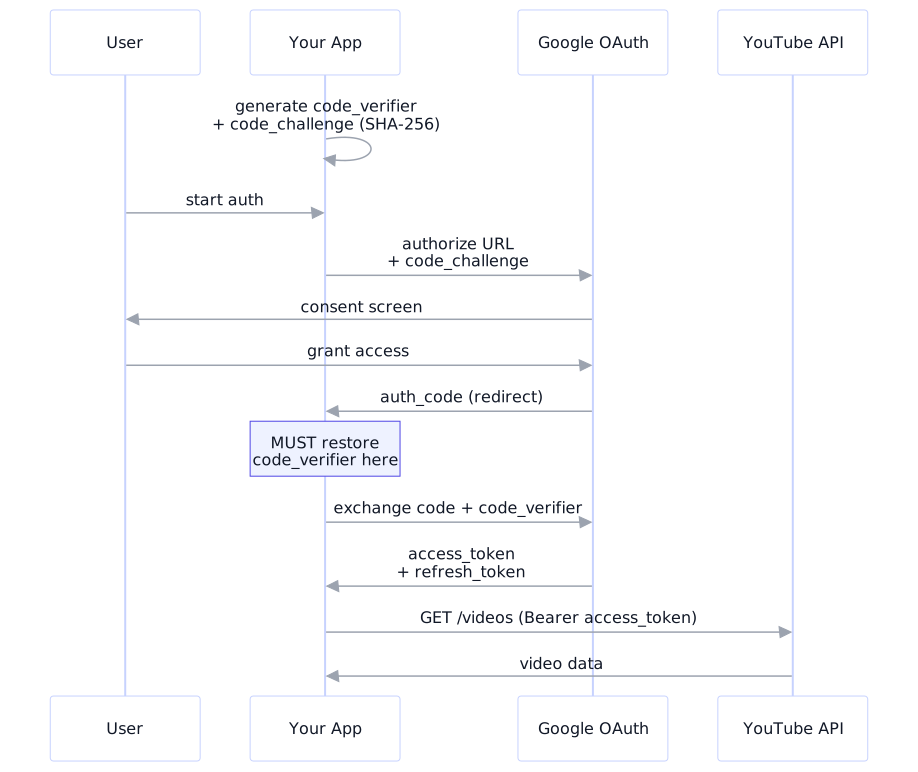
Two critical parameters. Setting access_type="offline" tells Google to return a refresh token. Setting prompt="consent" forces the consent screen every time, guaranteeing a fresh refresh token.
What PKCE Does
PKCE (Proof Key for Code Exchange, pronounced “pixie”) prevents authorization code interception attacks:
- Your client generates a random string called the
code_verifier. - It hashes that string (SHA-256) to create a
code_challenge. - The
code_challengeis sent with the authorization request. - During token exchange, the original
code_verifieris sent. Google hashes it and compares.
Google’s library (google-auth-oauthlib 0.5.0+) enables PKCE by default. You don’t configure it manually, but you must store and restore the code_verifier between requests.
Token Exchange
After the user grants permission, Google redirects to your callback with an authorization code. Now you exchange that code for tokens.
# Create a new Flow instance (stateless server, new request)
flow = Flow.from_client_secrets_file(
    "client_secret.json",
    scopes=SCOPES,
    state=state,
    redirect_uri=REDIRECT_URI,
)

# Restore the code_verifier from the cookie
flow.code_verifier = stored_code_verifier

# Exchange authorization code for tokens
flow.fetch_token(code=authorization_code)

credentials = flow.credentials
# credentials.token         -> access token
# credentials.refresh_token -> refresh token
# credentials.expiry        -> when the access token expires
The code_verifier Must Be Restored
This was the single most confusing bug I encountered. A new Flow object is created for token exchange (stateless server). The code_verifier from the original authorization MUST be stored (I used an httpOnly cookie) and restored before calling fetch_token(). Without it, Google returns “invalid_grant: Missing code verifier” with no further explanation. I spent two hours debugging this.
Cookie Configuration
The OAuth flow spans two HTTP requests, so you need cookies to persist the CSRF state and PKCE code_verifier. Getting cookie settings wrong silently breaks everything.
Cookie Settings: Development vs Production
| Attribute | Development | Production |
|---|---|---|
httponly |
True | True |
samesite |
Lax | Lax |
secure |
False | True |
max_age |
600 (10 min) | 600 (10 min) |
SameSite=Strict Breaks OAuth
OAuth callbacks are cross-site redirects: Google’s domain redirects to yours. SameSite=Strict blocks cookies on cross-site redirects entirely, so your state and code_verifier cookies vanish during the callback. Always use SameSite=Lax for OAuth cookies. Lax allows cookies on top-level navigations (redirects) while blocking them on cross-site POST requests.
Syncing All Your Videos (Including Private Ones)
The Uploads Playlist Trick
This is the single most important optimization in the entire YouTube API. Most tutorials tell you to use search.list to fetch your videos. That approach is expensive and incomplete.
Quota Cost Comparison
| Approach | What You Get | Cost per 50 Videos | Gets Private Videos? |
|---|---|---|---|
search.list(forMine=True) |
Public videos only | 100 units | No |
playlistItems.list(uploads) |
ALL videos | 1 unit | Yes |
Here’s the three-step process I use to sync an entire channel:
from googleapiclient.discovery import build

youtube = build("youtube", "v3", credentials=credentials)

# Step 1: Get the uploads playlist ID (costs 1 unit)
channel = youtube.channels().list(
    mine=True,
    part="contentDetails"
).execute()
uploads_id = channel["items"][0]["contentDetails"]["relatedPlaylists"]["uploads"]

# Step 2: Get all video IDs via the playlist (1 unit per 50 videos)
video_ids = []
request = youtube.playlistItems().list(
    playlistId=uploads_id,
    part="contentDetails",
    maxResults=50,
)
while request:
    response = request.execute()
    video_ids.extend(
        [item["contentDetails"]["videoId"] for item in response["items"]]
    )
    request = youtube.playlistItems().list_next(request, response)

# Step 3: Get full details in batches of 50 (1 unit per batch)
all_videos = []
for i in range(0, len(video_ids), 50):
    batch = ",".join(video_ids[i:i + 50])
    videos = youtube.videos().list(
        id=batch,
        part="snippet,status,statistics,contentDetails",
    ).execute()
    all_videos.extend(videos["items"])
50x Cheaper and Gets Private Videos
For a channel with 100 videos, the uploads playlist approach costs approximately 4 API units total. The search.list approach costs 200+ units and misses private and unlisted videos entirely. There is no reason to use search.list for syncing your own channel.
Updating Video Metadata
Once you have video data, you can update titles, descriptions, tags, and other metadata. The YouTube API’s update mechanism has a critical gotcha.
# Always fetch the current snippet first
current = youtube.videos().list(
    id=video_id,
    part="snippet",
).execute()
snippet = current["items"][0]["snippet"]

# Merge your changes into the existing snippet
snippet["title"] = new_title
snippet["description"] = new_description
snippet["tags"] = new_tags

# Push the update (costs 50 units)
youtube.videos().update(
    part="snippet",
    body={"id": video_id, "snippet": snippet},
).execute()
Always Fetch Before Updating
The YouTube API replaces the entire snippet on update. If you send only a title without the existing description, tags, and categoryId, those fields get wiped. Always fetch the current snippet, merge your changes, then push the full object. This cost me a panicked 30 minutes when I accidentally blanked out descriptions on a dozen test videos.
10 Bugs I Hit (and How I Fixed Them)
Every one of these bugs cost me anywhere from 20 minutes to half a day. Here’s the complete list so you can skip the pain.
| # | Bug | Symptom | Root Cause | Fix |
|---|---|---|---|---|
| 1 | redirect_uri_mismatch | Google error 400 | URI not registered in Console | Add exact URI (byte-for-byte) |
| 2 | access_denied (403) | “App not verified” | App in test mode | Add email to test users |
| 3 | CSRF validation failed | Silent redirect to error | SameSite=Strict on cookies | Change to SameSite=Lax |
| 4 | Cookie not sent | State cookie missing | Secure=True on HTTP localhost | Set Secure=False for dev |
| 5 | Missing code verifier | invalid_grant error | PKCE verifier not restored | Store in cookie, restore on exchange |
| 6 | Datetime comparison | “Can’t compare naive and aware” | Timezone on token expiry | expiry.replace(tzinfo=None) |
| 7 | channels.map crash | Frontend TypeError | FastAPI trailing slash redirect | @router.get("") not "/" |
| 8 | IDs instead of names | Cards show UCxxxx | Schema field mismatch | Align Pydantic and TS fields |
| 9 | Missing private videos | Only public videos sync | Using search.list | Switch to uploads playlist |
| 10 | Silent edit failures | Saves but nothing changes | Field name mismatch | Align names across the stack |
The Hardest One: Missing Code Verifier
Bug #5 was the most frustrating because nothing in the error message pointed to the actual problem. When you call flow.authorization_url(), the library silently generates a PKCE code_verifier. During the callback, your server creates a brand-new Flow object that has no knowledge of the verifier.
The error? Just "invalid_grant". No mention of PKCE, no mention of a missing verifier.
# During authorization: extract and store the verifier
auth_url, state = flow.authorization_url(access_type="offline", prompt="consent")
code_verifier = flow.code_verifier

# Store both in httpOnly cookies
response.set_cookie("oauth_state", state, httponly=True, samesite="lax", max_age=600)
response.set_cookie("oauth_verifier", code_verifier, httponly=True, samesite="lax", max_age=600)

# During callback: restore before exchanging
flow = Flow.from_client_secrets_file("client_secret.json", scopes=SCOPES, state=state, redirect_uri=REDIRECT_URI)
flow.code_verifier = request.cookies.get("oauth_verifier")  # This line fixes everything
flow.fetch_token(code=authorization_code)
The fix is two lines of code. Finding it took two hours of reading library source code.
The Sneaky One: Naive vs Aware Datetimes
Bug #6 is a Python classic in an unexpected place. The google-auth library stores token expiry as a timezone-aware datetime, but Python’s datetime.utcnow() returns a naive datetime. When your code checks if a token needs refreshing, Python raises:
# The problem: comparing aware and naive datetimes
TypeError: can't compare offset-naive and offset-aware datetimes

# The fix: strip timezone info before storing
expiry_naive = credentials.expiry.replace(tzinfo=None)

# Or in Python 3.12+: use timezone-aware everywhere
from datetime import datetime, timezone
if credentials.expiry < datetime.now(timezone.utc):
    refresh_token(credentials)
This crashes far from where the problem lives. The error appears when your app tries to make an API call, not during the OAuth flow itself.
Security Checklist
OAuth integrations are security-sensitive by nature. You're handling user tokens that grant access to their YouTube channel.
Security Checklist for YouTube OAuth Apps
- Validate the CSRF state parameter in the callback. Compare to the cookie value. Reject on mismatch.
- Validate the redirect URL against allowed origins. An open redirect lets attackers steal authorization codes.
- Never expose your client secret in frontend code, error messages, or logs.
- Validate YouTube API inputs: titles 100 chars max, descriptions 5,000, tags 500 total.
- Log full errors server-side, return generic messages to clients.
- Persist refreshed tokens to the database after every refresh. Google may rotate refresh tokens.
- Verify granted scopes match required scopes. Users can selectively deny permissions.
The Security Minimum
At minimum: validate the CSRF state, check the redirect URL against allowed origins, and never expose your client secret. These three measures alone prevent the most common OAuth attacks: CSRF, open redirect, and credential leakage.
FAQ
How do I get a YouTube Data API key?
Create a Google Cloud project at console.cloud.google.com, navigate to APIs & Services > Library, and enable the YouTube Data API v3. Then go to Credentials and create your key. For read-only public data, a simple API key works. For private data or write operations, you need OAuth 2.0 client credentials, which is what this guide covers.
What is the YouTube API daily quota limit?
Every Google Cloud project gets 10,000 quota units per day. A search costs 100 units, listing videos costs 1 unit, and updating a video costs 50 units. Using the uploads playlist approach (1 unit per 50 videos) keeps most applications well within the daily limit. You can request a quota increase through Google Cloud Console, but approval takes weeks and is not guaranteed.
Can I extract YouTube video transcripts with the API?
The official YouTube Data API does not provide transcript access for videos you don't own. The Captions API only works for videos on channels you've authenticated. For third-party transcripts, use a library like youtube-transcript-api (Python), which scrapes the player page. This approach is unofficial and can break when YouTube updates their frontend.
Is it legal to use the YouTube Data API?
Yes. The YouTube Data API is Google's official interface for accessing YouTube data programmatically. You must follow the YouTube API Terms of Service: don't store data longer than 30 days without refreshing, display the YouTube logo when showing their data, and provide a way for users to revoke access.
How much does the YouTube Data API cost?
The API is free within the daily quota of 10,000 units per project. You only pay for other Google Cloud services if you use them. For most personal projects and small applications, the free quota is more than enough. My app syncs channels with hundreds of videos and rarely uses more than 500 units per day.
Why does Google return "invalid_grant" during OAuth?
The most common cause is a missing PKCE code_verifier. Modern versions of google-auth-oauthlib enable PKCE by default, generating a code_verifier during authorization. If you don't store and restore this verifier during token exchange, Google rejects the request with "invalid_grant." Other causes: expired authorization codes (10-minute limit), mismatched redirect URIs, and already-used codes (they're single-use). See the Missing Code Verifier section for the full debugging story.
Related Reading
If you’re building API integrations on a VPS, these might help:
- Claude Code on a VPS: Deploy and Build from Your Terminal: automate deployments of your integration (no GitHub Actions needed)
- Advanced Claude Code VPS Setup: The Full Workstation Pattern: run Claude Code directly on the VPS so dev + deploy live in one place
- AI systems that scale: I build custom pipelines like this for clients (bulk YouTube management, SEO automation, private knowledge bases)